Building kakemono: A Wallpaper Manager That Comes With Me to Any OS
TL;DR
- kakemono is a wallpaper manager for macOS, Linux and Windows. A small daemon downloads wallpapers from Wallhaven, Unsplash, Reddit, Bing, NASA's Astronomy Picture of the Day, or your own folders, and changes the wallpaper on a timer
- One Rust binary is both the daemon and the command-line tool. A Tauri app adds a tray icon, a thumbnail picker and a settings window
- It started as a macOS-only Go app. I rewrote it in Rust so it keeps working if I ever move to Linux or Windows
- The code is public at github.com/RielJ/kakemono, and v0.1.0 has installers for all three systems
The demo turns on a Wallhaven search in Settings, opens the picker, and clicks a thumbnail. The new wallpaper is set before the Settings window closes.
How it started
Linux has Variety. It's a plain little app that does one job well. You give it a list of sources, it downloads images in the background, and every half hour your desktop changes. If you liked the last one, you step back to it. If you hated it, you trash it.
I wanted that on my Mac, so I wrote wallpaperd: a Go daemon with a command-line client, six image sources, and a Unix socket. I wired it into sketchybar, so my menu bar showed the current wallpaper and had next and previous buttons. I used it every day.
The code had a weak spot, though. It set the wallpaper by running osascript and asking System Events, which needs the Automation permission. It checked for dark mode by running defaults read. Everything that touched the desktop went through another program, and every one of those programs exists only on macOS.
I keep thinking about moving to Linux one day. If I do, I want my wallpaper setup to come with me, and I'd like it on a Windows machine too. So I asked my coding agent whether I should rewrite the app in Rust.
Its first answer was no. The app sleeps 99.9% of the time, Go handles timers and sockets well, and nobody would notice the speed difference. That's fair. But I didn't care about speed. I cared about two things: no dependence on other apps, and one codebase for three operating systems. With those goals, Rust and Tauri made sense, and the rewrite began.
I also needed a new name. wallpaperd is very close to wpaperd, an existing Rust wallpaper daemon for Wayland. A kakemono is a Japanese hanging scroll, a picture on the wall that people swap out with the seasons. That's close enough to what the app does.
What it does
- Sources. Wallhaven and Unsplash searches, a subreddit, Bing's daily images, NASA's APOD archive back to 1995, and local folders. You can add the same type more than once, for example two Wallhaven searches.
- Rotation. By default the wallpaper changes every 30 minutes. A background downloader fetches one new image every 10 minutes and keeps the download folder under 500 MB, oldest files first. It never deletes favorites.
- History, favorites and trash.
kakemono prevgoes back.favoritecopies the current image to a favorites folder.trashmoves it out and sets the next one, and the picker can undo that. - Light and dark. When the system switches theme, kakemono can set a new wallpaper and prefer images that suit the theme.
- Filters. The settings copy Variety's "When possible, use images that..." section: landscape only, or at least 80% of the screen resolution.
The picker is a strip of thumbnails along one edge of the screen. It has five tabs: Sources, Downloaded, Local, Favorites and Cache. The Sources tab shows previews from your online sources without downloading anything. A click downloads the full image and sets it. Every action has a key, so I rarely touch the mouse.

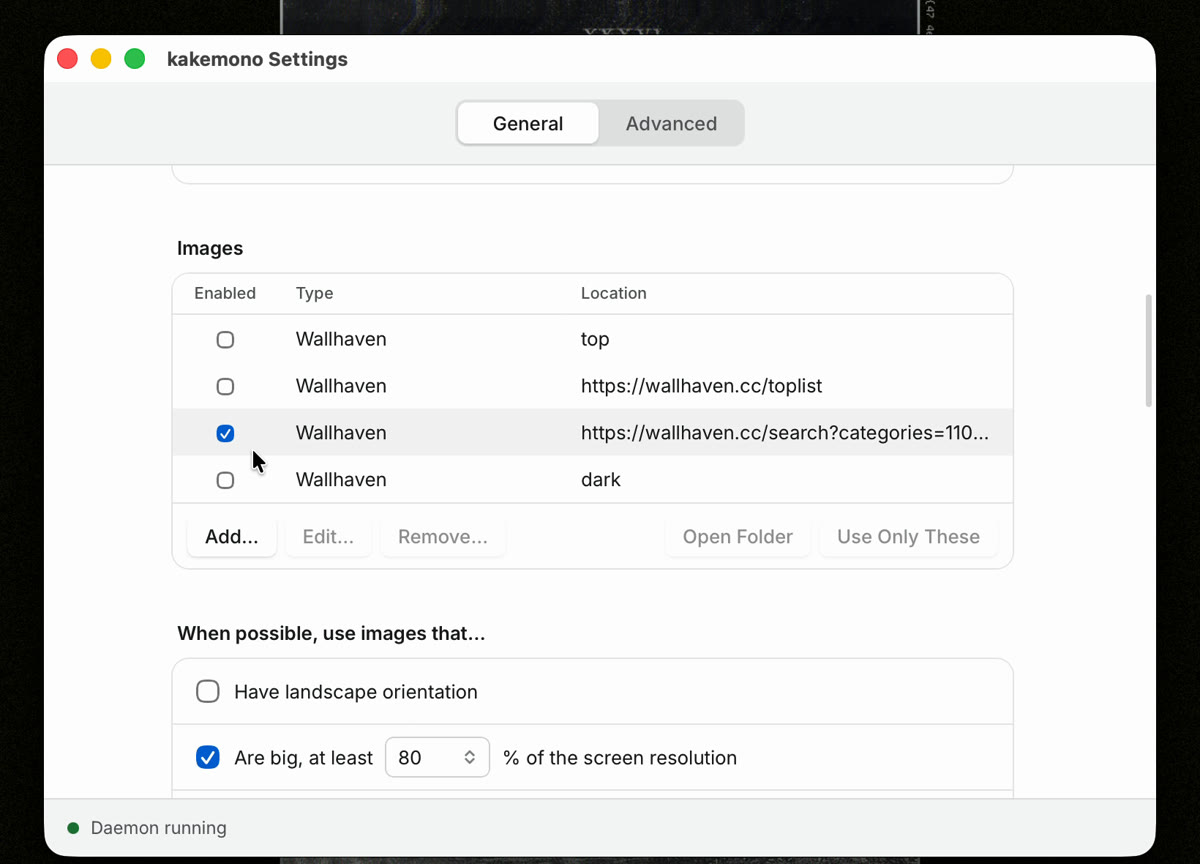
The settings window lists the sources in one table. You turn each one on or off, and "Use Only These" limits rotation to the ones you selected.
How it's built
There are two programs. kakemono is the daemon and the CLI in one binary. kakemono-ui is the Tauri app. Both talk to the daemon in newline-delimited JSON over a Unix socket, or a named pipe on Windows. That means you can script it with nc or jq, and my sketchybar plugin still works.
kakemono next ────┐
tray, picker, ────┼──▶ socket (named pipe on Windows) ──▶ daemon
settings          │                                        │
sketchybar ───────┘                                        ├─ sources: download images
                                                           ├─ engine: rotation, history, cache
                                                           └─ platform: set the wallpaper
The Rust workspace has eight crates: protocol, config, engine, sources, platform, fs, cli and ui. Only platform knows which OS it's on.
Setting the wallpaper is the part that differs most between systems:
- On macOS, kakemono calls
NSWorkspace setDesktopImageURL:forScreen:through objc2, once for each screen. Noosascript, and no Automation permission. One catch: macOS has no API that sets every Space, so only the current Space on each screen changes. - On Windows, it uses the
IDesktopWallpaperCOM interface from the windows crate. - Linux has no single API, so kakemono detects the session. It checks for a desktop environment (GNOME, KDE, XFCE and others), then for a wallpaper daemon that's already running (
swww,hyprpaper), then the compositor (Hyprland, Sway, niri), then X11 tools likefeh. That covers 17 backends.kakemono detecttells you which one it picked and why. If yours isn't covered, you can set your own command.
The tools:
| Part | Tools |
|---|---|
| Daemon and CLI | Rust, tokio, clap, reqwest with rustls, serde, tracing |
| Native APIs | objc2 (macOS), windows-rs (Windows), zbus for D-Bus (Linux) |
| App | Tauri 2, React 19, TypeScript, Tailwind CSS 4, Vite |
| Tests | cargo test, insta snapshots, Vitest, Testing Library |
| CI and releases | GitHub Actions on macOS, Linux and Windows, Docker, QEMU |
How I built it
I built kakemono with coding agents in Pi. First, four models each wrote a plan, and I merged the best parts into one. Next, I wrote short contracts for the pieces that crates share: the config format, the platform API and the source interface. Then subagents built slices against those contracts in parallel, each in its own git worktree, which I wrote about in my pi-git-worktrees post. The rewrite took 152 commits over two days.
Three things kept the rewrite honest:
- Golden fixtures from the Go app. Before writing any Rust, I recorded what the Go daemon sent and received on its socket, and how it read its config. The Rust tests replay those recordings, so the new daemon had to answer the way the old one did.
- Lots of tests. There are 1,422 Rust tests and 392 frontend tests. The source tests replay recorded HTTP responses, so they never hit Wallhaven or Reddit.
- Testing on systems I don't own. GitHub Actions tests every push on macOS, Linux and Windows. I also wanted to catch failures before pushing, so the Linux checks run locally in Docker. The Windows checks run in a Windows 11 ARM virtual machine on my M4 MacBook, through QEMU and Apple's Hypervisor framework. A script installs Windows from an answer file with no clicks, runs the same tests CI runs, and shuts the VM down.
One surprise came at the end. I downloaded the first release on my other laptop, and macOS said the app "is damaged and can't be opened". It wasn't damaged. The app isn't signed with an Apple Developer ID, so macOS blocks it when it's downloaded from the internet. The fix is one command, and it's in the install steps below.
How to use it
Download the installer for your system from the Releases page.
macOS. Open the .dmg (aarch64 for Apple silicon, x64 for Intel) and drag kakemono to Applications. Because the build isn't signed, clear the quarantine flag before you open it:
xattr -dr com.apple.quarantine /Applications/kakemono.appLinux. Install the .deb or .rpm, or run the AppImage:
sudo apt install ./kakemono_0.1.0_amd64.deb      # Debian, Ubuntu
sudo dnf install ./kakemono-0.1.0-1.x86_64.rpm   # Fedora
Windows. Run the .msi or the -setup.exe. When SmartScreen warns about an unknown publisher, click More info, then Run anyway.
Open the app. It starts the daemon and puts an icon in the menu bar, tray or notification area. From there you can open Settings, add a source, and open the picker.
If you prefer the terminal:
kakemono service install   # start the daemon at login
kakemono next              # set a new wallpaper now
kakemono prev              # go back to the previous one
kakemono favorite          # keep this one
kakemono trash             # never show this one again
kakemono pause             # stop rotating; `kakemono resume` starts again
Sources live in ~/.config/kakemono/config.toml, one [[sources]] table each:
[daemon]
interval = "30m"

[[sources]]
id = "wh-nature"
type = "wallhaven"
location = "nature"

[[sources]]
id = "pictures"
type = "folder"
location = "~/Pictures/Wallpapers"
On Linux, run kakemono detect once to see which backend it picked. If the wallpaper doesn't change, kakemono doctor prints the session, the command it would run, and what the daemon is doing.
The README has every command and config key. If you try it and something breaks on your desktop, please open an issue.