Building pi-git-worktrees: Parallel AI Agent Sessions with Git Worktrees
TL;DR
- pi-git-worktrees is a Pi coding agent extension that spawns parallel AI agents, each in its own git worktree
- Uses tmux's hidden sessions and
display-popupfor seamless viewing without leaving your terminal - Full orchestration with fan-out / wait / gather pattern — dispatch work and collect results
- Live status widgets show real-time busy/idle state via heartbeat monitoring
- Install with
npm install -g pi-git-worktrees
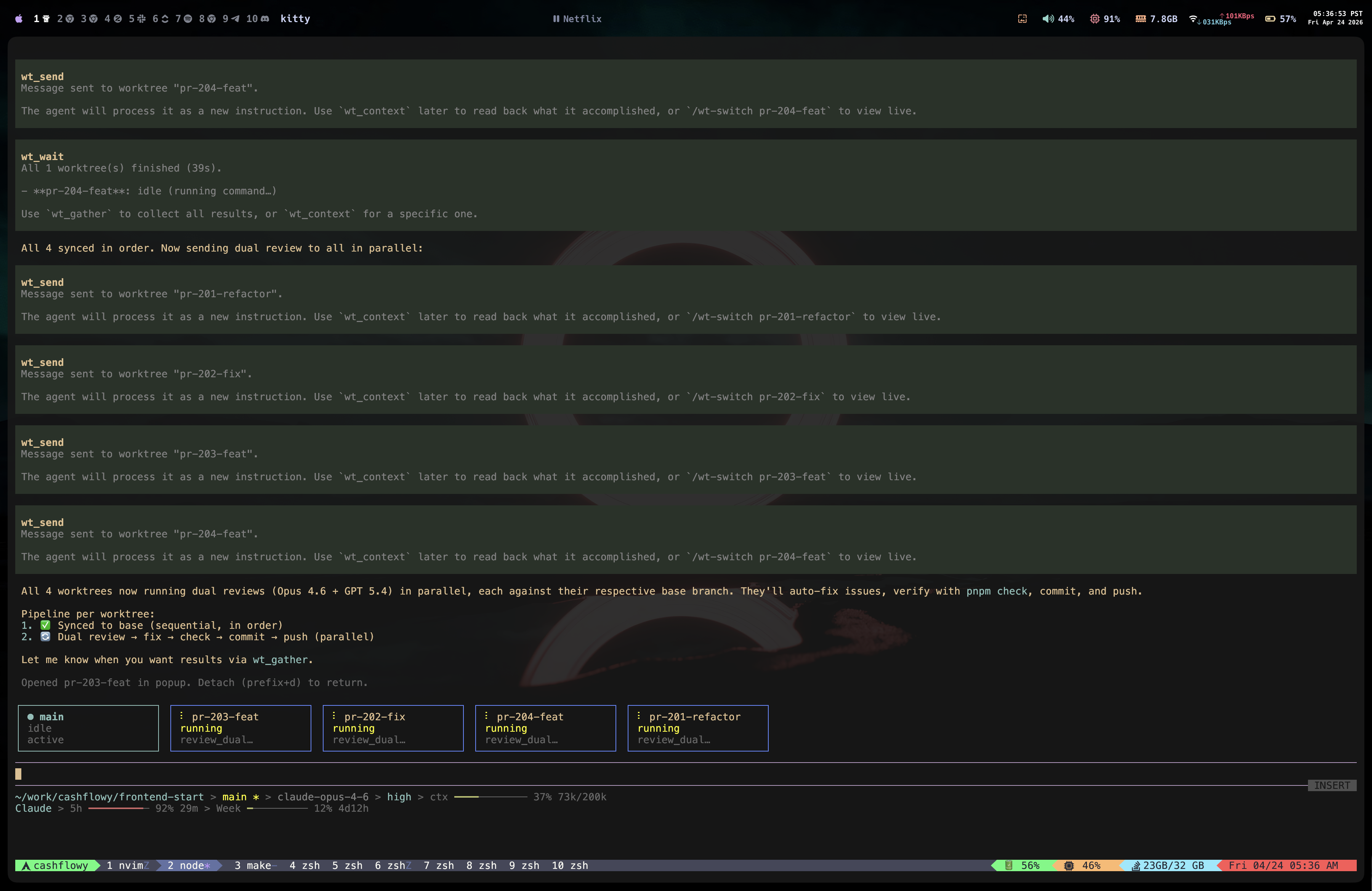
Main session orchestrating 4 worktree agents — sending dual reviews to all in parallel, with live status widget showing each agent's activity.
If you've used Pi coding agent for any non-trivial project, you've probably wished you could have multiple agents working on different tasks simultaneously. Fix the auth bug in one session, add tests in another, update docs in a third — all without context-switching.
I built pi-git-worktrees to make this possible. It spawns multiple Pi agents, each running in its own isolated git worktree on a dedicated branch, all orchestrated from your main session.
The Problem
Working with a single AI agent is inherently sequential. You ask it to fix a bug, wait for it to finish, then ask it to write tests, wait again, then update docs. Even when tasks are independent, you're bottlenecked on one conversation.
The obvious solution is "just open multiple terminals," but that creates its own problems:
- No coordination — agents might conflict on the same files
- No visibility — you can't see what all agents are doing at a glance
- No orchestration — you can't dispatch work and collect results programmatically
- Git conflicts — multiple agents editing the same branch is a recipe for disaster
Git worktrees solve the filesystem isolation problem elegantly. Each worktree is a separate checkout of your repo on its own branch. Combined with tmux for session management, you get true parallel agent execution.
Architecture
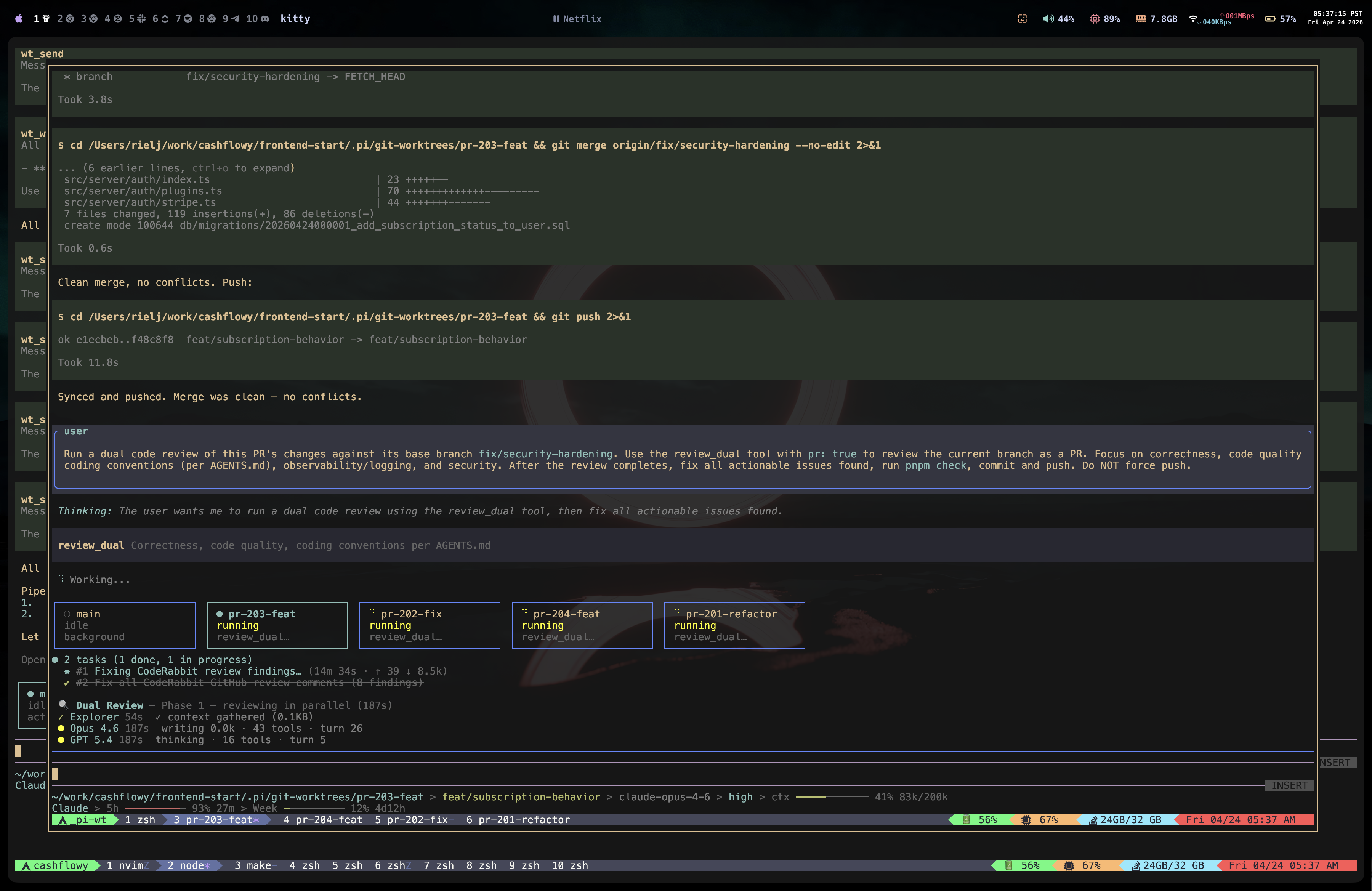
Floating tmux popup showing a worktree agent running a dual code review, merging changes, and pushing — all autonomously.
The extension manages everything through a hidden tmux session called _pi-wt:
┌─────────────────────────────────────────────┐
│  Main Pi Session                            │
│                                             │
│  ┌─ Widget ──────────────────────────────┐  │
│  │ ● main    ∴ fix-auth   ∴ add-tests   │  │
│  │  idle      running      running       │  │
│  └───────────────────────────────────────┘  │
│                                             │
│  Tools: wt_new, wt_send, wt_wait,           │
│         wt_gather, wt_context               │
└───────────┬─────────────┬───────────────────┘
            │ tmux        │ tmux
            │ send-keys   │ send-keys
            ▼             ▼
┌───────────────┐ ┌───────────────┐
│ _pi-wt:fix-auth│ │ _pi-wt:add-tests│
│ Pi agent      │ │ Pi agent      │
│ Own branch    │ │ Own branch    │
│ Own worktree  │ │ Own worktree  │
└───────────────┘ └───────────────┘
Each worktree agent runs as a named window inside the hidden _pi-wt tmux session. Your own tmux sessions are never touched.
How It Works
1. Spawning a Worktree
When you create a worktree (via wt_new tool or /wt-new command), several things happen:
- Git worktree creation —
git worktree addcreates an isolated checkout on a new branch - Session seeding — a Pi session file is created with the task as the first user message
- tmux window spawn — a new window is created in the hidden
_pi-wtsession, running Pi inside it - Registry update — the worktree metadata is recorded in
.pi/wt-agents/registry.json
The slug generation strips stop words and creates a clean identifier:
const STOP_WORDS = new Set([
  "a", "an", "the", "to", "in", "on", "at", "of", "for",
  "and", "or", "is", "it", "be", "do", "with", "this", "that",
]);

export function slugFromTask(task: string): string {
  const words = task
    .toLowerCase()
    .replace(/[^a-z0-9\s-]/g, "")
    .split(/\s+/)
    .filter((w) => w && !STOP_WORDS.has(w));
  return words.slice(0, 4).join("-") || "worktree";
}
2. tmux Session Management
The tmux layer is the core infrastructure. All worktree agents live as windows in a single pool session:
const POOL_SESSION = "_pi-wt";

function ensurePoolSession(): void {
  try {
    execFileSync("tmux", ["has-session", "-t", POOL_SESSION], { stdio: "ignore" });
  } catch {
    execFileSync("tmux", [
      "new-session", "-d", "-s", POOL_SESSION, "-x", "200", "-y", "50",
    ]);
    // Prevent auto-destroy when all windows close
    execFileSync("tmux", [
      "set-option", "-t", POOL_SESSION, "destroy-unattached", "off"
    ], { stdio: "ignore" });
  }
}
Viewing a worktree opens a floating popup via tmux display-popup. This overlays your current pane without switching windows or sessions. Dismiss the popup and you're back to main — the worktree agent keeps running.
3. Heartbeat Monitoring
Each worktree agent writes heartbeat files (JSON, updated every 2 seconds) to a shared directory. The main session polls these to detect busy/idle state:
~/.pi-git-worktrees/
├── fix-auth.json     ← { "busy": true, "ts": 1714012345678 }
├── add-tests.json    ← { "busy": false, "ts": 1714012345680 }
└── ...
This feeds the live status widget that renders above your input — horizontal boxes showing each worktree's current state.
4. The Orchestration Pattern
The real power is in orchestration. The agent can use a fan-out / wait / gather pattern:
Fan-out — dispatch independent tasks to worktrees:
wt_new("fix auth bug",       branch: "fix/auth")
wt_new("add API tests",      branch: "feat/api-tests")
wt_new("update docs",        branch: "chore/docs-update")
Wait — poll heartbeats until all worktrees are idle:
wt_wait() → checks every 3s until all agents finish
Gather — compile context from all worktrees into a single report:
wt_gather() → extracts structured summaries from session files
The main agent can then synthesize results, identify conflicts, and coordinate merges.
5. Communication
Sending follow-up instructions to a running worktree uses tmux send-keys to deliver text directly to the agent's input:
export function sendKeysToSession(sessionName: string, text: string): void {
  execFileSync("tmux", [
    "send-keys", "-t", `${POOL_SESSION}:${sessionName}`, text, "Enter"
  ]);
}
This lets the main session redirect, refine, or add context to any running agent mid-task.
The Interactive Panel
The /worktrees command opens a full interactive panel with keyboard navigation:
↑/↓— navigate between worktrees←/→— switch tabs (Worktrees / Actions / Settings)n— create new worktrees— send message to selected worktreem— merge worktree branch backd— remove worktreec— import context
This is built using Pi's TUI component system, rendering directly in the terminal with full keyboard event handling.
Technical Decisions
Why tmux hidden sessions? I considered running agents as background processes, but tmux gives you free interactivity — you can view, interact with, and debug any agent by opening a popup. Background processes would need a custom TUI for I/O.
Why file-based heartbeats? IPC via Unix sockets or named pipes would be more efficient, but file-based heartbeats are dead simple, work across process boundaries, and survive agent restarts. The 2-second polling interval is fast enough for human perception.
Why a single pool session? Having one _pi-wt session with named windows is cleaner than creating separate tmux sessions per worktree. It simplifies lifecycle management and makes display-popup targeting straightforward.
Why registry.json? Git worktrees are stateless from Pi's perspective — we need metadata like task descriptions, branch names, creation times, and session file paths. A simple JSON registry in .pi/wt-agents/ tracks this without external dependencies.
What's Next
- Worktree profiles — automatically detect project type and configure agents accordingly
- Conflict detection — warn when two worktrees modify the same files
- Auto-merge strategies — smart merge ordering based on dependency analysis
- Resource limits — cap concurrent worktrees based on system resources
Check it out on GitHub and let me know what you think. Install with:
npm install -g pi-git-worktrees