Building pi-image-preview: Inline Image Previews with Kitty Graphics in tmux
TL;DR
- pi-image-preview renders inline image thumbnails above the editor in Pi coding agent
- Uses the kitty graphics protocol with Unicode placeholders (
U=1) for pane-aware rendering - Full tmux support — images appear/disappear correctly when switching panes
- Paste an image with
Ctrl+V, see a preview, submit and it's attached to your message - Install with
pi install npm:pi-image-preview
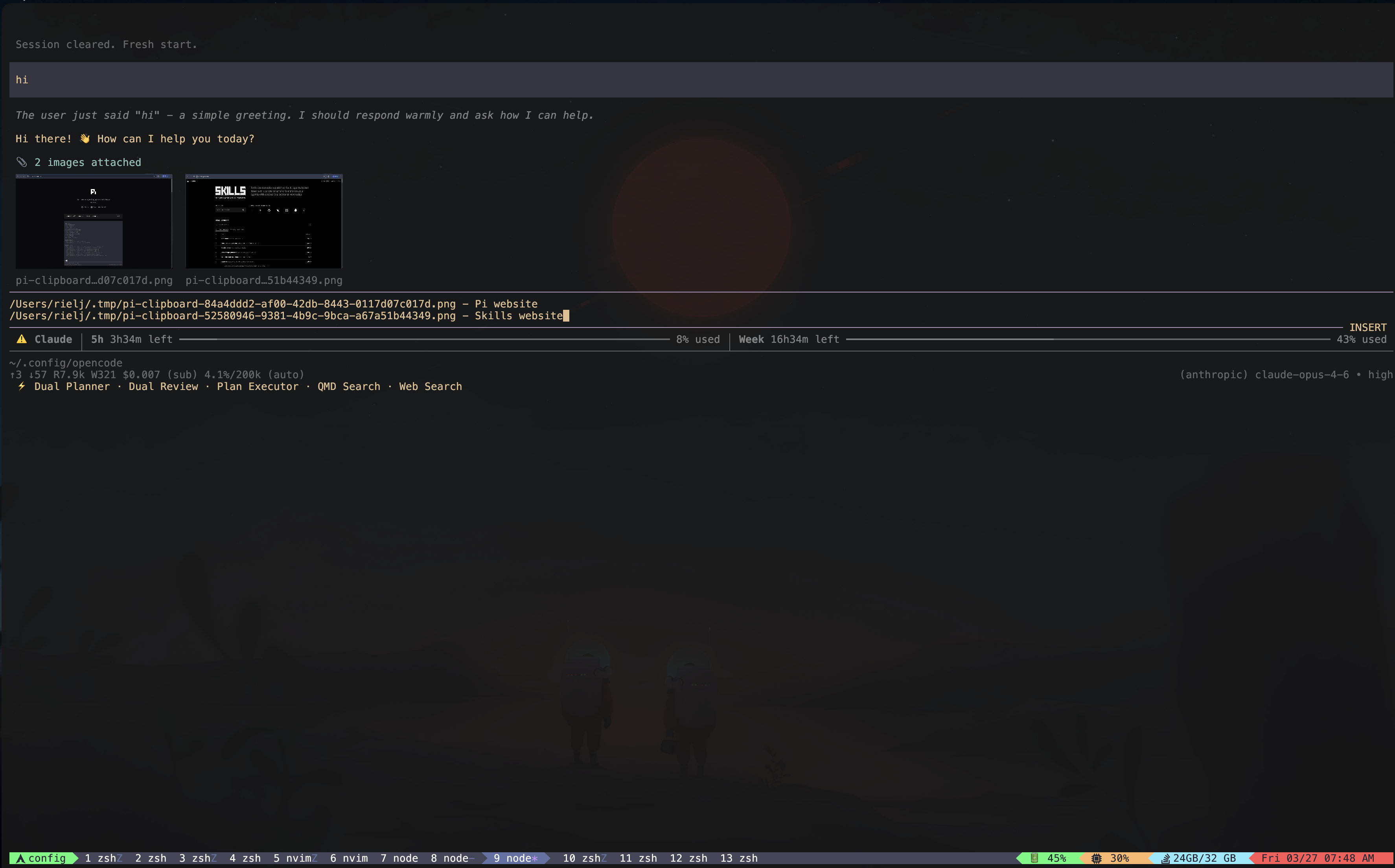
Inline image preview rendered above the Pi editor using the kitty graphics protocol inside tmux.
Terminal-based coding agents are powerful, but they have a blind spot: images. When you're working with screenshots, UI mockups, or debugging visual output, pasting an image path and hoping the AI understands is suboptimal. You want to see the image right there in your terminal.
I built pi-image-preview to solve this for Pi coding agent. It renders inline image thumbnails above the editor using the kitty graphics protocol — and it works inside tmux, which is where the real engineering challenge was.
The Problem
Terminal image rendering sounds simple until you try it inside tmux. The standard kitty graphics protocol renders pixels at absolute terminal positions. This means:
- An image rendered in pane 1 is still visible when you switch to pane 2 ("ghosting")
- Scrolling doesn't move the image — it stays at its absolute position
- tmux has no knowledge of the rendered pixels — they exist outside its text buffer
For a coding agent where you're constantly switching context, this is unusable.
The Unicode Placeholder Protocol
Kitty's answer to this is the Unicode placeholder protocol (U=1). Instead of rendering pixels directly, it works in two steps:
- Transmit the image data with the
U=1flag — kitty stores the image but doesn't render it - Output Unicode characters (
U+10EEEEwith combining diacritics) where the image should appear
These characters are regular text from tmux's perspective. They live in the text buffer. When you switch panes, tmux swaps the buffer — placeholders disappear — image disappears. Switch back — placeholders redrawn — image reappears. No ghosting.
Here's how the extension detects whether to use this protocol:
function detectImageProtocol(): ImageProtocol | null {
  const caps = getCapabilities();
  if (caps.images) return caps.images;

  // pi-tui returns null inside tmux — check if the outer terminal is kitty
  const inTmux = !!process.env.TMUX ||
    (process.env.TERM?.toLowerCase() || "").startsWith("tmux");

  if (inTmux) {
    if (process.env.KITTY_WINDOW_ID ||
        (process.env.TERM_PROGRAM?.toLowerCase() || "") === "kitty") {
      return "kitty";
    }
    // ghostty and wezterm also support kitty graphics in tmux
    const termProgram = process.env.TERM_PROGRAM?.toLowerCase() || "";
    if (termProgram === "ghostty" || process.env.GHOSTTY_RESOURCES_DIR)
      return "kitty";
    if (termProgram === "wezterm" || process.env.WEZTERM_PANE)
      return "kitty";
  }

  return null;
}
This was necessary because pi-tui (Pi's terminal UI library) conservatively returns images: null inside tmux. But since we specifically use the Unicode placeholder protocol which is designed for tmux, we can safely detect kitty-in-tmux ourselves.
Architecture
The extension plugs into Pi's extension API and manages images through three components:
1. Image Detection & Polling
A 250ms poll loop watches the editor text for image file paths:
const IMAGE_PATH_RE =
  /((?:~\/|\.\.?\/|\/)[^\s:*?"<>|][^\s:*?"<>|]*\.(?:png|jpe?g|gif|webp))(?=\s|$)/gi;
When you paste an image with Ctrl+V, Pi saves the clipboard to a temp file and inserts the path into the editor. The extension detects the path, reads the file, and triggers a preview render.
2. Image Content Pipeline
Reading and resizing images is handled asynchronously to keep the UI responsive:
export async function readImageContentFromPathAsync(
  filePath: string,
): Promise<ImageContent | null> {
  if (!(await looksLikeImagePathAsync(filePath))) return null;

  const stat = await fsp.stat(filePath);
  if (stat.size > MAX_IMAGE_FILE_SIZE) return null; // 50MB limit

  const mimeType = inferMimeType(filePath)!;
  const bytes = await fsp.readFile(filePath);
  return {
    type: "image",
    data: bytes.toString("base64"),
    mimeType,
  };
}
The extension leverages Pi's built-in WASM image resizer for efficient thumbnailing. It dynamically loads the resizer from Pi's distribution:
async function loadPiImageResizer(): Promise<ImageResizer | null> {
  const require = createRequire(import.meta.url);
  const piEntry = require.resolve("@mariozechner/pi-coding-agent");
  const distDir = path.dirname(piEntry);
  const moduleUrl = pathToFileURL(
    path.join(distDir, "utils", "image-resize.js")
  ).href;
  const mod = await import(moduleUrl);
  return mod.resizeImage ? async (image) => {
    const resized = await mod.resizeImage!(image);
    return { type: "image", data: resized.data, mimeType: resized.mimeType };
  } : null;
}
3. The Gallery Renderer
Multiple images display side-by-side in a horizontal layout. The gallery calculates dimensions and renders using Pi's widget system:
const THUMB_MAX_WIDTH = 25;  // columns
const THUMB_MAX_ROWS = 15;   // cap height
const GAP = 2;               // columns between images

// Monotonic counter for kitty image IDs
let nextImageId = 1;
function allocateImageId(): number {
  const id = nextImageId;
  nextImageId = (nextImageId % 0xffffff) + 1; // wrap at 16M, skip 0
  return id;
}
Image IDs use a monotonic counter instead of random values. Early versions used Math.random() * 254, which caused birthday-paradox collisions — two images occasionally getting the same ID, corrupting the display. The monotonic counter with the full 24-bit kitty range (1–16,777,215) eliminates this.
The Input Transform
When you submit a message, the extension intercepts the input event and transforms it:
- Strip image paths from the text (the user doesn't want raw paths in their message)
- Attach images as content blocks to the message
- Clear the preview widget
This is done via Pi's input event transform API:
type InputResult =
  | { action: "continue" }   // pass through unchanged
  | { action: "handled" }    // consumed, don't send
  | { action: "transform"; text: string; images: ImageContent[] };
The transform strips the file paths and returns the cleaned text with images attached — so the AI model receives both the text and the actual image data.
Screenshot Integration
The extension also upgrades tool results from Pi's screenshot tool. When an agent takes a screenshot, the result normally contains just an image content block. The extension hooks into the tool_result event and adds an inline preview, so you see the screenshot rendered in the terminal immediately.
Technical Decisions
Why kitty graphics over iTerm2/Sixel? Kitty's Unicode placeholder protocol is the only one that works correctly inside tmux. iTerm2's inline images and Sixel both render at absolute positions and ghost across panes. The tradeoff is terminal compatibility — kitty, ghostty, and wezterm only.
Why poll at 250ms instead of watching file events? The editor text changes come from Pi's internal state, not the filesystem. File watchers (fs.watch) wouldn't catch clipboard pastes that go through Pi's editor. Polling the editor text is the reliable approach, and 250ms is imperceptible.
Why dynamic WASM resizer loading? Bundling an image resizer would bloat the extension. Pi already ships with a WASM-based resizer for its own image handling. Dynamically loading it via createRequire means zero additional dependencies while getting efficient native-speed resizing.
Why U+10EEEE specifically? This is kitty's designated Unicode placeholder codepoint. It lives in a Private Use Area (Supplementary PUA-B) so it never conflicts with real text. Combined with combining diacritical marks that encode the image ID and position, each cell "knows" which piece of which image it represents.
Limitations
A few honest limitations worth noting:
- Kitty-family terminals only — no support for iTerm2, Alacritty, or vanilla Terminal.app
- Fixed thumbnail size — 25 columns wide, not yet configurable
- GIF animation — only the first frame renders
- SSH sessions — kitty graphics don't survive SSH unless you use
kitten ssh
What's Next
- Configurable thumbnail sizes — let users set max width/height
- Image selection/navigation — click or keyboard-navigate between multiple images
- GIF animation support — render animated GIFs frame-by-frame
- Sixel fallback — for terminals that support Sixel but not kitty graphics
Check it out on GitHub and install with:
pi install npm:pi-image-preview