Building profile-rag: A Chatbot About My Work That Cites Its Sources
TL;DR
- profile-rag answers questions about my work from sources I reviewed and approved: my resume, project READMEs, blog posts, and GitHub contributions
- Every answer links to the excerpts it used. If the sources don't cover a question, it says so instead of guessing
- It's built on RAG (retrieval-augmented generation). The section below explains RAG with diagrams, no machine-learning background needed
- It caught a misleading line in my own resume
- The code is public: github.com/rielj/profile-rag
A question about my Docker work at Cashflowy. The answer streams in as the model writes it, then the cited excerpts appear below.
A chatbot that answers questions about you sounds simple: give a language model your resume and let people ask. The trouble is that a language model will answer anyway, whether or not it knows. Ask about a project it hasn't seen and it fills the gap with something plausible. For a page that speaks for me, a plausible guess is worse than no answer.
So I set three rules before writing any code:
- Answer only from documents I have read and approved.
- Show the excerpts behind every answer, so a reader can check them.
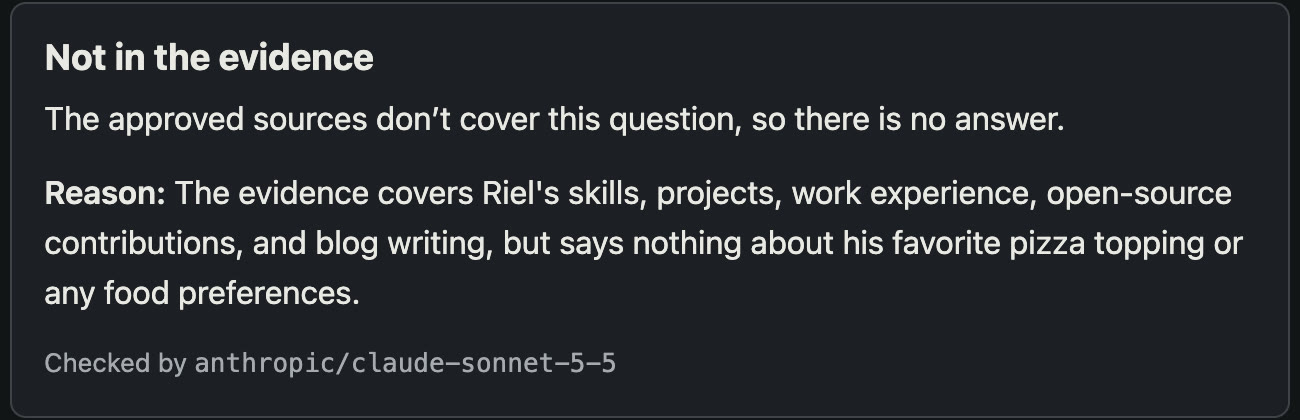
- When the documents don't cover a question, say so.
How RAG works, in plain terms
RAG stands for retrieval-augmented generation. The name describes the three steps: retrieve relevant text, augment the question with it, then generate an answer. Think of the difference between a closed-book and an open-book exam.
A plain chatbot sits a closed-book exam. It answers from whatever it absorbed in training, which doesn't include my resume. A RAG app sits an open-book exam: before answering, it looks up the relevant pages and hands them to the model with the question. The model then writes its answer from those pages, and the app can show you which pages it used.
That leaves two problems: building the library, and finding the right pages in it quickly.
Step 1: Build the library
Before anyone asks a question, the documents are prepared once.
The review step is the one I care most about. Each source gets copied into the project and I read it in a terminal session: it highlights anything that looks like an email address, phone number, secret, or internal hostname, then asks five privacy questions. Only a source that gets "yes" to all five can be approved. The approval records a fingerprint of the file (its SHA-256 hash). If I edit the file later, the fingerprint no longer matches, and indexing refuses to run until I review it again. Nothing reaches the library without passing through me.
Approved documents are then split into chunks, small passages of a few paragraphs each. A chunk is cut at a heading and keeps its full heading path, such as "Cashflowy › What Riel worked on › Docker builds and deployment". Headings often name the company or project that the paragraph below never repeats, so keeping them makes the chunk findable.
Step 2: Turn meaning into numbers
Computers can't compare meanings directly, but they can compare numbers. An embedding model reads a chunk and produces a list of 768 numbers that describe what it's about. Chunks about similar things get similar numbers. I run the embedding model (nomic-embed-text) locally with Ollama, so my documents don't leave my machine for this step.
You can picture those numbers as coordinates on a map:
A question gets turned into numbers the same way and dropped onto the same map. The chunks closest to it are the ones most likely to answer it. That's why this kind of search finds "pip to uv migration" when you ask about "faster Docker builds": the words differ, but the meaning is close.
Step 3: Search two ways, then merge
Meaning search has a weak spot: exact names. A question about "pgvector" or "PR #1158" is best served by plain keyword matching. So the app runs both searches and merges the results.
The merge is called reciprocal rank fusion. It ignores the raw scores of the two searches, which aren't comparable, and uses only each chunk's position in each list. A chunk near the top of both lists beats a chunk at the top of only one. On my labeled test questions this hybrid search put the first relevant chunk higher than meaning search alone: its MRR (a score for how high the first right answer ranks) went from 0.512 to 0.611.
The top 8 chunks go to the model.
Step 4: Answer, or say so
The model gets the question, the 8 excerpts, and a short set of rules. Then the app checks what it wrote.
answered with an answer and citations, or unknown with a reason.Each excerpt is labeled with whose words it is. My resume is a self-report, a project README describes a project, and a recommendation would be a third party. The model has to keep those apart, so answers read "According to Riel's resume, …" rather than turning a project's feature list into a claim about what I personally built. The rules also tell it that text inside an excerpt is data, not instructions, so a document can't take over the prompt.
The reply must be a structured object: either answered with the answer and the IDs of the excerpts it cites, or unknown with a reason. A reply in any other shape is thrown away. So is a reply that cites an excerpt it was never given, because a made-up citation is a made-up answer.
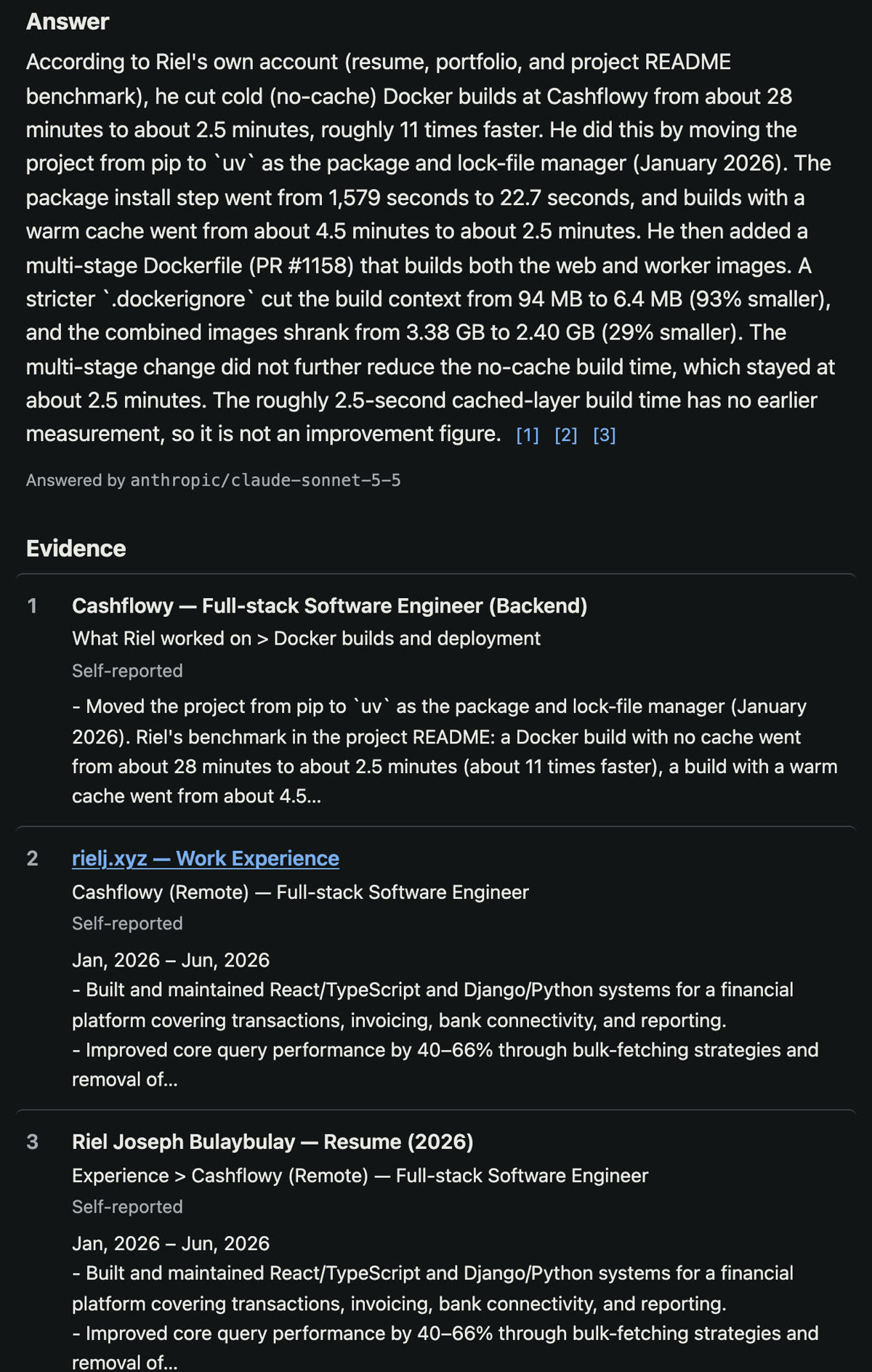
Here's what a passing answer looks like. The numbers in brackets link to the excerpts listed below the answer:
And here's a question the sources don't cover:
What it's built with
| Part | Tools |
|---|---|
| Library | Postgres with pgvector, for both the embeddings and the keyword index |
| Embeddings | nomic-embed-text v1.5 through Ollama, on my machine |
| Answer chain | LangChain, with Pydantic models for the reply format |
| Model calls | Pi coding agent, started fresh for each question with no tools, no session file, and no project settings |
| API | FastAPI, with typed responses that the frontend's types are generated from |
| Page | React and TypeScript on Vite |
| Tests | pytest, Vitest, and Playwright, using a fake model and fake embeddings so they run without either |
Running each question in a fresh Pi process with everything switched off is deliberate. The model sees the question and the excerpts and nothing else, and no copy of the conversation is saved to disk.
Measuring instead of guessing
It's easy to make a RAG app look good on a demo question. To know whether it actually finds the right passages, I wrote a set of test questions over my real sources and labeled which passages answer each one: 34 answerable questions plus 5 that the sources can't answer. The app's eval command runs every question and scores the search.
That's how I picked the search method. Meaning search and hybrid search found the same share of the labeled passages: on average, 78% of the passages that answer a question were in its top 8 (recall@8 of 0.779). Hybrid ranked the first right passage higher, so it became the default. A third method, MMR, which trades relevance for variety, scored lower on both and stayed off.
The same approach settled a bigger question. I also built an "agent" version with LangGraph: it asks the model to grade the retrieved excerpts and, if they look weak, rewrites the question and searches again. It sounds smarter, so I measured it. On the 14 questions of the fictional example profile, the agent answered exactly the same questions as the plain pipeline, but made 36 model calls instead of 14. Its rewrites never changed an outcome. The plain pipeline stays the default, and the agent stays in the code, with a written note to test it again on the larger set of questions about my real sources.
Making it stream
The first version showed nothing until the full answer was ready, which felt slow. Most chat apps show text as it's written, so I added that.
There was one complication. The model doesn't write plain text; it writes a structured object like {"status": "answered", "answer": "…", "citations": [...]}. Showing that raw would be ugly. So the server reads the half-finished object as it arrives, pulls out only the growing answer text, and sends each new piece to the page as one line of JSON in a streamed response.
The citation checks can only run on the complete reply. So while the text streams, the page labels it a draft ("Writing… Sources are checked when the answer is complete") and shows no citation links. When the reply is done and checked, the page swaps in the final answer with its sources. If the check fails, the draft disappears and the page shows the failure instead. You never get a checked-looking answer that wasn't checked.
The bug it found in my resume
The most useful thing profile-rag did was tell me something about my own resume.
I asked it how much faster I made the Docker builds at Cashflowy. It answered "about 2.5 seconds", citing my resume and my portfolio. Both said that, because I had rewritten the line a few days earlier. But the Cashflowy repository told a different story:
- Moving the project from pip to uv cut Docker builds with no cache from about 28 minutes to about 2.5 minutes. That's the real speedup.
- A later multi-stage Dockerfile cut the build context by 93% and the images by 29%, but didn't make builds faster.
- "2.5 seconds" was the time of a build that reuses cached layers. Nobody had measured that before the change, so it isn't an improvement at all.
The app had done its job: it reported what the sources said, and it showed me exactly which sources said it. The sources were wrong. I corrected the line on my resume and my portfolio, added the repository's measurements to my Cashflowy work notes, re-reviewed all three sources, and rebuilt the index. Now the same question gets the answer in the video above, citing three sources, and it explains why the 2.5-second figure doesn't count.
A RAG app can't be more accurate than its library. Citations don't make the answers true, but they make every answer traceable to the line that produced it, and that's what let me find the mistake.
What's next
profile-rag runs on one machine, for one owner. It has no login and no rate limit, so it isn't on the open internet yet. A public version needs a per-visitor rate limit and a spending cap on the model provider before anything else. Until then, the repository includes a fictional profile (Dana Whitlock) so anyone can run the whole app locally with make demo, no private data needed.
The code, the architecture notes, and the evaluation reports are on GitHub: github.com/rielj/profile-rag.